CLI Coding Style
This section outlines the code style guidelines for developing the Compose CLI.
Follow the CLI modular architecture when adding or changing code.
Architecture
The CLI uses a pipeline-oriented modular architecture with four main concepts:
- Context (
ctx) carries command parameters, config, module state, and execution status. - Pipelines define workflows, coordinate module execution, resolve adapters, and manage control flow.
- Modules implement focused CLI business logic.
- Adapters isolate external tools, frameworks, libraries, APIs, and runtime-specific behavior.
Each command creates a context, sends it through one or more pipelines, and lets modules add their own results to ctx.state.
Component relationship
- Pipelines orchestrate the flow and decide which modules run.
- Modules handle feature logic and use adapters when they need external tooling.
- Shared context carries the pipeline state, so each step can understand what earlier steps produced.
- Module changes should preserve existing
ctx.statefields and add new fields instead of removing fields that later steps may read.
This keeps components replaceable, extensible, and easy to reason about as the CLI grows.
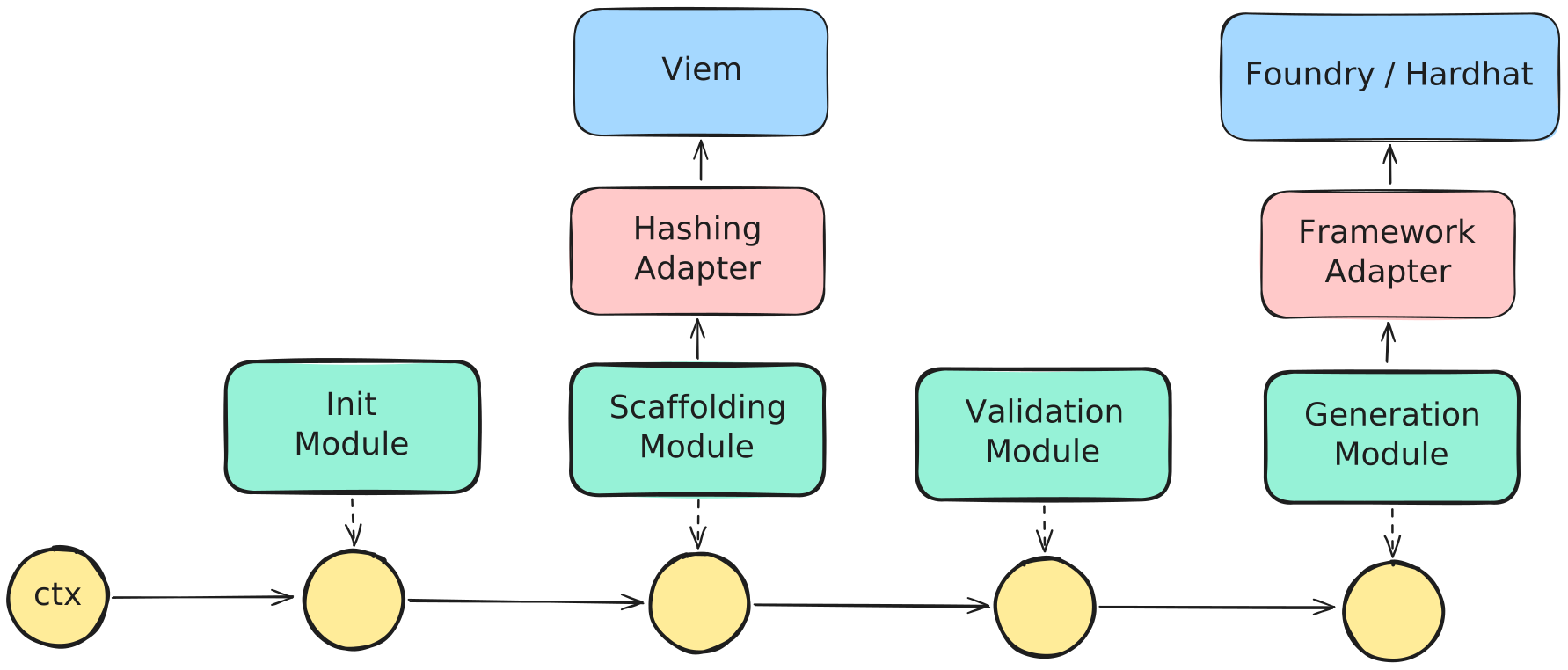
Pipeline-oriented modular architecture
Implementation
Context
Path: cli/src/context
Use ctx when code participates in a pipeline.
- Module actions should receive
ctxand returnctx. - Pipelines pass
ctxthrough the workflow and decide what happens next. - Child pipelines should create their own scoped context from the parent context, containing only the data needed for that child workflow.
- After a child pipeline finishes, the parent pipeline should append the child result or child context into its own
ctx.state. - Module helpers should avoid using
ctxunless they need to read module state or derive a module-specific model from pipeline context.
Example:
export type ComposeError = {
  code: string;
  message: string;
  nativeError: unknown | null;
};

export type ModuleState<T = unknown> = {
  success: boolean;
  result: T | null;
  error: ComposeError | null;
};

export type ChildPipelineState = {
  success: boolean;
  state: Record<string, ModuleState>;
  status: ExecutionStatus;
};

export type ComposeContext = {
  param: Record<string, unknown>;
  config: Record<string, unknown>;
  state: Record<string, ModuleState | ChildPipelineState>;
  status: ExecutionStatus;
};

export const Context = {
  create(): ComposeContext {
    return {
      param: {},
      config: {},
      state: {},
      status: {
        success: true,
        stopped: false,
        failedAt: null,
        error: null,
      },
    };
  },
};
Module
Path: cli/src/modules/<feature>/module.ts
Use a module when the code owns Compose CLI behavior or domain meaning.
- Use
module.tsfor pipeline-facing actions. - Pipeline-facing module actions should receive
ctxand returnctx. - A module action may write its own result into
ctx.state. - Do not let a module action modify another module's state directly.
Example:
export const InfoModule = {
  async displayProjectInfo(ctx: ComposeContext): Promise<ComposeContext> {
    ctx = await loadComposeJson(ctx);
    ctx = parseProjectInfo(ctx);
    ctx = await scanFacets(ctx);
    showInfo(ctx);

    return ctx;
  },
};
Module helper
Path: cli/src/modules/<feature>/*.ts
Add a helper directly inside a module folder when the code supports that module but should not be a pipeline step.
- Module helpers can be aware of that module's business logic.
- Helpers may read
ctxor module state when needed. - Helpers do not need to use the
ctx in -> ctx outshape. - Return focused values such as models, selected facets, validation issues, render output, or typed state reads.
- Keep domain-aware helpers inside the module folder, not in
utils.
For example, deployGeneration/module.ts owns the pipeline-facing action, while deployGeneration/model.ts and deployGeneration/renderers.ts provide deploy-generation helpers.
Pipeline
Path: cli/src/pipelines
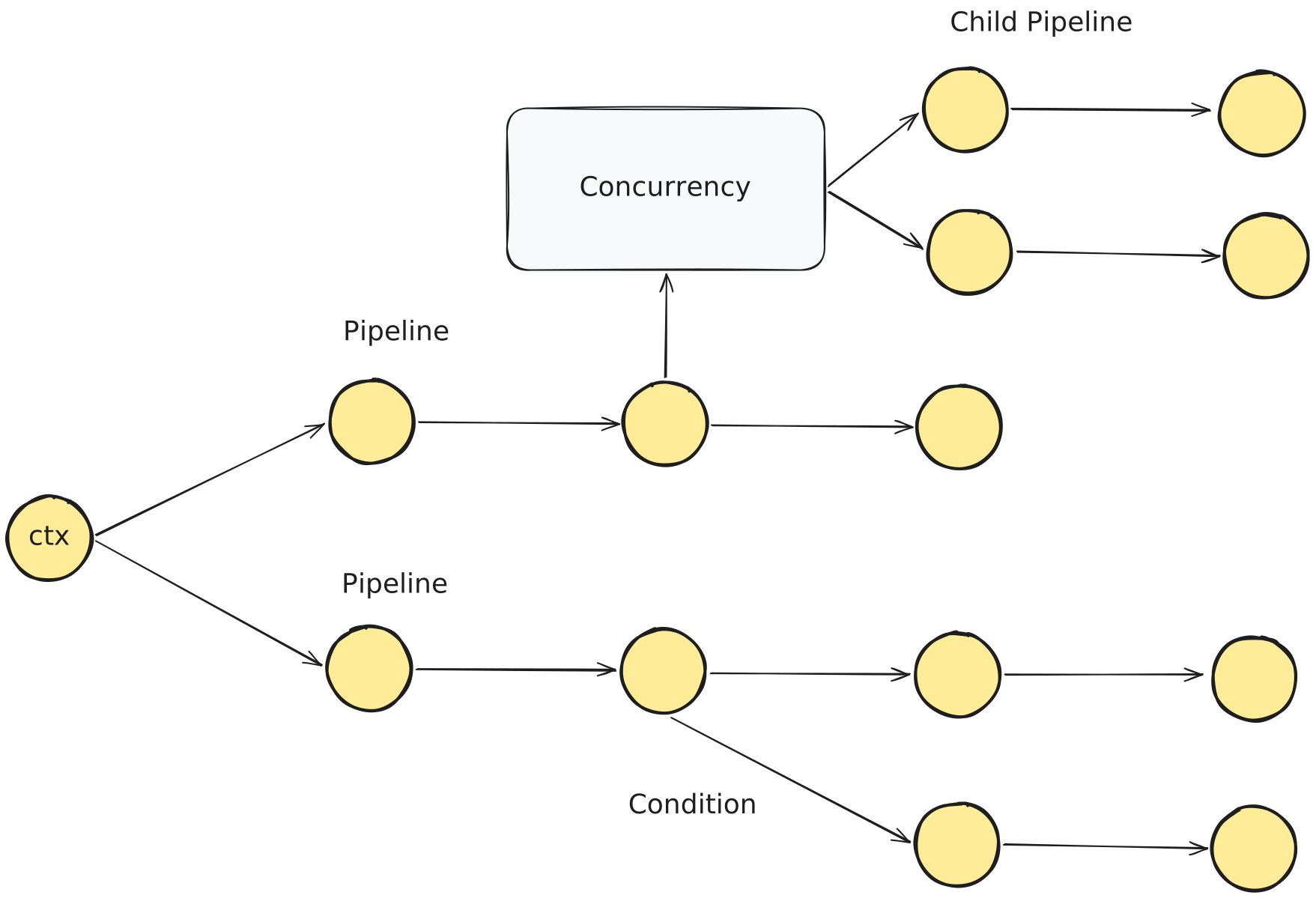
Use a pipeline when code defines an ordered workflow.
- A pipeline is an orchestrator: it decides which modules run, which adapters they receive, and how the workflow moves forward.
- A pipeline should coordinate modules, not implement business logic directly.
- A pipeline may resolve adapter dependencies and pass them into modules.
- A pipeline can call another pipeline. When a pipeline is called by another pipeline, it becomes a child pipeline.
- Use a child pipeline when multiple workflows need the same ordered set of behavior.
- Child pipelines are also useful when a group of steps needs isolation, concurrency, or room to grow.
- Avoid deeply nested pipelines.
Example:
export const CatalogPipeline = {
  async execute(ctx: ComposeContext): Promise<ComposeContext> {
    ctx = await ConfigModule.loadBasesCatalog(ctx);
    CatalogModule.showTemplates(ctx);
    return ctx;
  },
};
For a larger orchestration example, see cli/src/pipelines/initPipeline.ts.
Adapter
Path: cli/src/adapters

Use an adapter when a module needs to call an external tool, framework, library, API, or runtime.
- Modules should call stable adapter interfaces instead of depending directly on external libraries.
- A module should receive needed adapters through its function arguments.
- A pipeline should resolve adapter dependencies explicitly and pass them into the module.
- Feature logic and validation should be handled in modules.
- External communication and library-specific details should be handled in adapters.
- Organize adapters by interface. Keep the interface and every implementation of that contract in the same
I<AdapterName>/directory. - For stable dependencies that are unlikely to change often, such as basic CLI parsing or filesystem access, a module helper, module, or util may be more practical than adding an adapter.
Example:
export interface IHashingAdapter {
  keccak256(value: string): Hex;
}

export const HashingAdapter: IHashingAdapter = {
  keccak256(value: string): Hex {
    return keccak256(stringToBytes(value));
  },
};
Dependency resolver
Path: cli/src/resolver
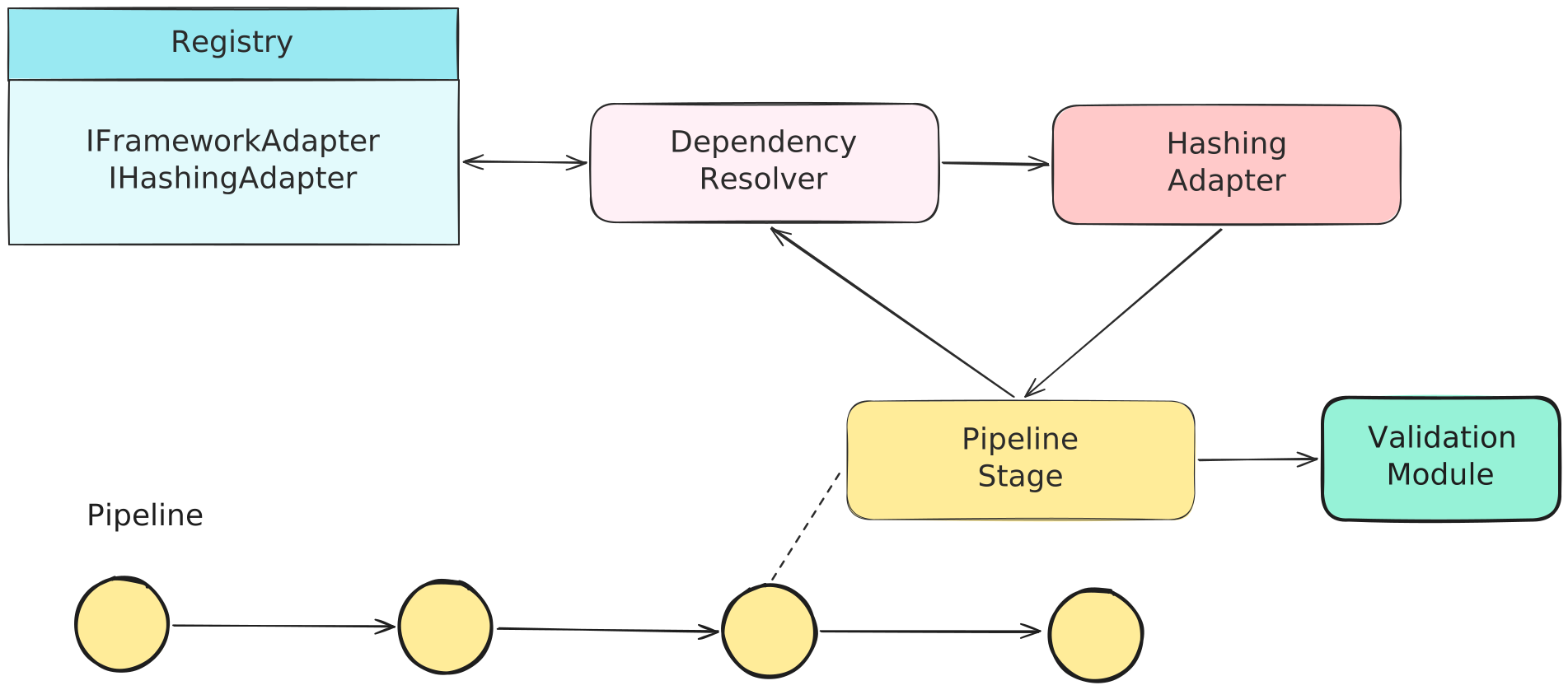
Use the dependency resolver when a pipeline needs adapters.
- Add new adapter keys to
DependencyKey. - Register adapter factories in
DependencyRegistry. - Pipelines can call
DependencyResolverwhen orchestrating a module that requires an adapter, then provide the resolved dependency through the module action arguments.
Example:
const deps = await DependencyResolver.resolve([
  { key: DependencyKey.Hashing },
  { key: framework as DependencyKey },
]);
Utils
Path: cli/src/utils
Use utils for small mechanical helpers only.
- Good examples: file helpers, path helpers, string helpers, regex helpers, terminal color helpers.
- Do not put Compose domain logic in
utils. - If a helper understands facets, bases, selectors, storage layouts, scaffolding, validation rules, or module state, keep it inside a module folder.
Style Checklist
- Code follows the pipeline/module/helper/adapter boundaries.
- Pipelines resolve adapters, orchestrate modules, and return when the workflow finishes or fails. They do not own business logic.
- New adapters are registered in the dependency resolver before pipelines use them.
- Module actions update only their own
ctx.stateentry. - Domain-aware helpers live with the module they support.